

One Sign-In for Every App
for Teams and Individuals
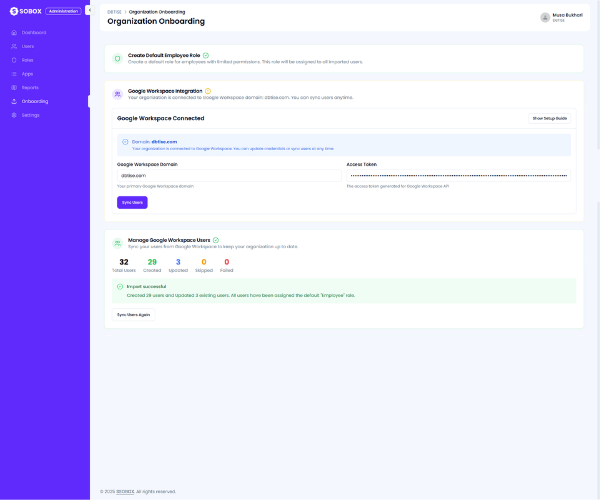
Single sign-on for your company's apps, automatic people sync from Google Workspace, Microsoft 365 and Active Directory, and saved logins that sign you in to any website, including your bank.





Everything in one place
for every sign-in
Single sign-on, people sync, saved logins and security policies
in one product for your team and for yourself
SSOBOX for Teams
Give every employee one sign-in for the apps they need, and remove access everywhere the moment someone leaves.
- Single sign-on with SAML 2.0 and OpenID Connect
- People sync from Google Workspace, Microsoft 365, SCIM and Active Directory
- Groups decide who gets which app
- Shared team logins with controlled use and reveal permissions
SSOBOX Personal
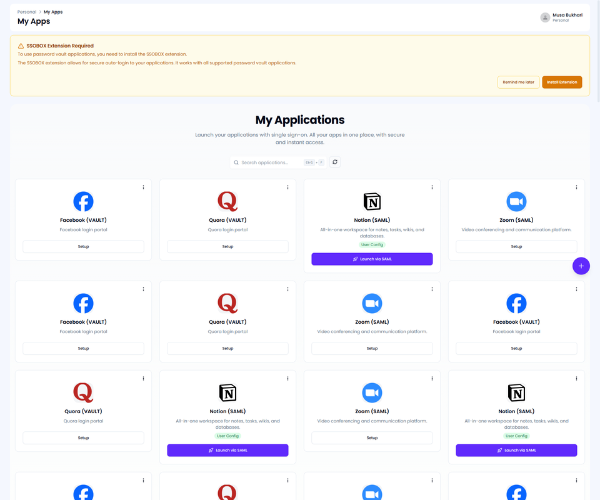
All your logins in one place, including banks with several accounts and authenticator codes.
- Saved logins for any website
- Authenticator codes filled for you
- Share selected logins with family
- Several accounts at the same site
Security & Activity
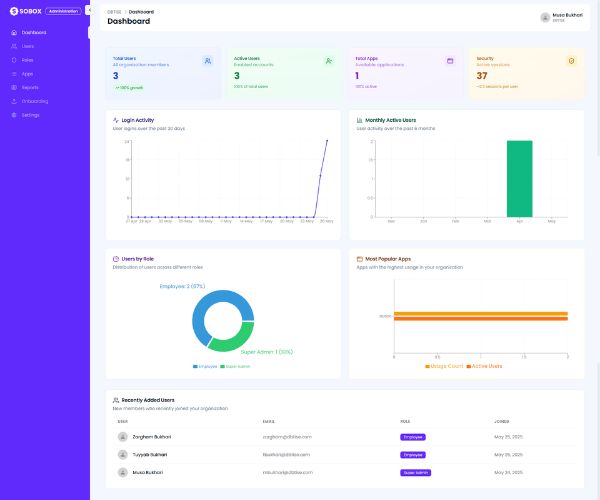
Policies that apply everywhere people sign in, and a tamper-evident record of who did what.
- Two-step verification and passkeys
- Required sign-in policies per organization
- Tamper-evident activity log with export
- Sign-in alerts and session controls
Saved Logins
Click an app and SSOBOX signs you in: username, password, extra steps and the authenticator code. Only on the site's real address, never on look-alikes.
- Browser extension for Chrome and Edge
- Multi-step logins, including banks
- Mobile app with the same one-tap sign-in
- Encrypted, and never filled on the wrong site

Enterprise Ready
Built for Modern Businesses
Single sign-on, automatic people sync and access control
that an IT team can set up in an afternoon
People & Directories
Keep people in sync with the system you already use
- Google Workspace and Microsoft 365
- SCIM, Active Directory and LDAP
- Spreadsheet and REST imports
Apps & Single Sign-On
Connect the apps your company uses, with guided setup
- Ready-made setups for popular apps
- SAML 2.0 and OpenID Connect
- Saved logins for apps without SSO
Security Controls
Policies and controls that follow people everywhere
- Roles and custom roles
- Sign in with your company identity provider
- Required two-step verification
Ready to transform your business?
Simple Process
How It Works
From sign-up to single sign-on in four steps
No consultants, no long projects
Create Your Organization
Sign up, create your organization and verify your email domain
Bring In Your People
Connect Google Workspace, Microsoft 365, SCIM or Active Directory, or invite people by email
Add Your Apps
Pick apps from the catalog or add your own, then assign them to groups
Go Live
Everyone signs in once and opens every app from their launchpad
Ready to streamline your authentication?
Free for teams of up to 5 people. No credit card required.
Personal Features
Designed for You
Every login you have, in one place
with one-click sign-in on your computer and your phone
Saved Logins
Store usernames, passwords, extra fields and authenticator codes, encrypted and filled for you
- One-click sign-in
- Authenticator codes
- Breached-password checks
Your Launchpad
Personal logins and work apps side by side, and several SSOBOX accounts signed in at once
- Work and personal together
- Several accounts per site
- Search with Ctrl K
Sharing Circles
Share selected logins with family or friends, and decide whether they can see the password or only use it
- Family and friends circles
- Use-only or viewable
- Remove access any time
Web App
Manage everything from any browser, no installation needed
Browser Extension
One-click sign-in in Chrome and Edge
Mobile App
Your launchpad on Android, with fingerprint or face unlock
Works With Tricky Logins
Multi-step pages, customer numbers and one-time codes, including banks
Bring All Your Logins Together
Free for personal use. Upgrade to Personal Plus for bigger sharing circles.
FAQ
Frequently Asked Questions
Find answers to common questions about SSOBOX's features and functionality
Single sign-on lets people sign in once and open all their work apps without separate passwords. With SSOBOX you get:
- One place to give and remove access to every app
- No more separate passwords for each app
- People added and removed automatically from your directory
- Every app one click away on the launchpad
SSOBOX implements multiple layers of security:
- Standard SAML 2.0 and OpenID Connect sign-in
- Saved passwords encrypted at rest and only filled on the right website
- Two-step verification, passkeys and breached-password checks
- Rate limits, sign-in alerts and session controls
- A tamper-evident activity log you can export
Most teams are running the same day:
- Create your organization: a few minutes
- Connect your directory: about 15 minutes
- Each app: a few minutes with the guided setup
- People get an email and sign in right away
SSOBOX works with:
- Any app that supports SAML 2.0 or OpenID Connect
- Your own apps, through OpenID Connect
- Any website with a login page, through saved logins
- Directories: Google Workspace, Microsoft 365, SCIM, Active Directory, LDAP
- Company sign-in through Entra ID, Okta, Google and other identity providers
We offer comprehensive support options:
- Email support for every plan
- Priority help for Business customers
- Step-by-step setup guides for each app
- Help moving from your current tools
- Security questions answered for your IT team
Contact Us
Get in Touch
Have questions? We'd love to hear from you. Send us a
message
and we'll respond as soon as possible